
728x90
6강까지 우리는 적, HP, 골드까지 갖춘 자동으로 흘러가는 게임을 만들었습니다.
이제부터는 플레이어가 직접 개입해야 합니다.
7강의 목표는 아주 명확합니다.
- 마우스 클릭을 감지하고
- 클릭한 좌표를 얻고
- 그 좌표를 게임 로직에서 사용할 수 있게 만드는 것
1. 마우스 입력은 이벤트로 처리한다
Pygame에서 마우스 클릭은 이벤트(event) 로 들어옵니다.
if event.type == pygame.MOUSEBUTTONDOWN:
    mouse_pos = pygame.mouse.get_pos()
- MOUSEBUTTONDOWN : 마우스 버튼을 눌렀을 때
- get_pos() : (x, y) 좌표 반환
2. 클릭 좌표를 저장하는 이유
클릭 좌표를 바로 쓰지 않고 변수로 저장해두면 좋습니다.
- 디버깅용 표시
- 나중에 타워 설치 위치로 사용
- 설치 가능 / 불가능 판정에 사용
selected_pos = None
3. 클릭 위치를 화면에 표시해보기
지금은 타워가 없기 때문에,
클릭한 위치에 원 하나를 그려서 확인합니다.
if selected_pos:
    pygame.draw.circle(screen, (80, 160, 255), selected_pos, 8)
이렇게 하면 “좌표 감각”이 확실히 잡힙니다.
4. 마우스 입력은 메인 루프 안에서만 처리
아래 흐름이 기본 패턴입니다.
- 이벤트 처리
- 입력값 저장
- 게임 로직 처리
- 화면에 결과 출력
이 구조를 지키면 이후 기능이 늘어나도 코드가 꼬이지 않습니다.
5. 실행 결과
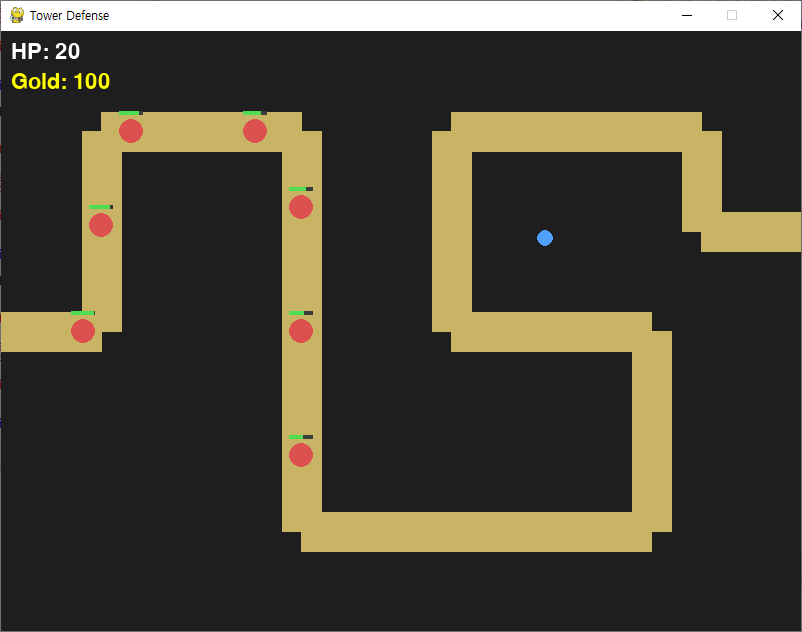
전체 코드
더보기
import pygame
import sys

pygame.init()

# -----------------------------
# 화면 설정
# -----------------------------
SCREEN_WIDTH = 800
SCREEN_HEIGHT = 600
screen = pygame.display.set_mode((SCREEN_WIDTH, SCREEN_HEIGHT))
pygame.display.set_caption("Tower Defense")

clock = pygame.time.Clock()
FPS = 60

# -----------------------------
# 경로 좌표
# -----------------------------
path_points = [
    (0, 300),
    (100, 300),
    (100, 100),
    (300, 100),
    (300, 500),
    (650, 500),
    (650, 300),
    (450, 300),
    (450, 100),
    (700, 100),
    (700, 200),
    (800, 200)
]

# -----------------------------
# Enemy 클래스
# -----------------------------
class Enemy:
    def __init__(self, path_points, speed=2):
        self.path_points = path_points
        self.speed = speed

        self.x, self.y = path_points[0]
        self.target_index = 1

        self.max_hp = 50
        self.hp = self.max_hp
        self.reward = 10

        self.reached_end = False
        self.is_dead = False

        self.radius = 12

    def update(self):
        if self.reached_end or self.is_dead:
            return

        # 임시 데미지
        self.hp -= 0.05
        if self.hp <= 0:
            self.is_dead = True
            return

        if self.target_index >= len(self.path_points):
            self.reached_end = True
            return

        tx, ty = self.path_points[self.target_index]
        dx = tx - self.x
        dy = ty - self.y

        dist = (dx * dx + dy * dy) ** 0.5
        if dist == 0:
            self.target_index += 1
            return

        self.x += (dx / dist) * self.speed
        self.y += (dy / dist) * self.speed

        if dist <= self.speed:
            self.x, self.y = tx, ty
            self.target_index += 1
            if self.target_index >= len(self.path_points):
                self.reached_end = True

    def draw(self, screen):
        # 적 본체
        pygame.draw.circle(
            screen, (220, 80, 80),
            (int(self.x), int(self.y)), self.radius
        )

        # HP 바
        bar_width = 24
        bar_height = 4
        hp_ratio = self.hp / self.max_hp

        pygame.draw.rect(
            screen, (60, 60, 60),
            (self.x - 12, self.y - 20, bar_width, bar_height)
        )
        pygame.draw.rect(
            screen, (80, 220, 80),
            (self.x - 12, self.y - 20, bar_width * hp_ratio, bar_height)
        )

# -----------------------------
# 게임 변수
# -----------------------------
enemies = []

spawn_interval = 1000
last_spawn_time = 0

base_hp = 20
gold = 100

font = pygame.font.SysFont(None, 32)

# 클릭한 좌표 저장
selected_pos = None

# -----------------------------
# 메인 루프
# -----------------------------
while True:
    for event in pygame.event.get():
        if event.type == pygame.QUIT:
            pygame.quit()
            sys.exit()

        # 마우스 클릭 처리
        if event.type == pygame.MOUSEBUTTONDOWN:
            if event.button == 1:  # 왼쪽 클릭
                selected_pos = pygame.mouse.get_pos()

    game_over = base_hp <= 0

    if not game_over:
        # 적 스폰
        now = pygame.time.get_ticks()
        if now - last_spawn_time >= spawn_interval:
            enemies.append(Enemy(path_points))
            last_spawn_time = now

        # 적 업데이트
        for enemy in enemies:
            enemy.update()

        # 도착한 적 처리
        arrived = [e for e in enemies if e.reached_end]
        base_hp -= len(arrived)

        # 죽은 적 처리
        dead = [e for e in enemies if e.is_dead]
        gold += sum(e.reward for e in dead)

        # 적 정리
        enemies = [e for e in enemies if not e.reached_end and not e.is_dead]

    # -----------------------------
    # 화면 그리기
    # -----------------------------
    screen.fill((30, 30, 30))
    pygame.draw.lines(screen, (200, 180, 100), False, path_points, 40)

    # 적 출력
    for enemy in enemies:
        enemy.draw(screen)

    # 클릭 위치 표시
    if selected_pos:
        pygame.draw.circle(screen, (80, 160, 255), selected_pos, 8)

    # UI
    screen.blit(font.render(f"HP: {base_hp}", True, (255, 255, 255)), (10, 10))
    screen.blit(font.render(f"Gold: {gold}", True, (255, 255, 0)), (10, 40))

    if game_over:
        over_text = font.render("GAME OVER", True, (255, 255, 255))
        screen.blit(
            over_text,
            (SCREEN_WIDTH // 2 - over_text.get_width() // 2,
             SCREEN_HEIGHT // 2)
        )

    pygame.display.update()
    clock.tick(FPS)
728x90
'⚙️ Python > 🎮 Pygame 실전' 카테고리의 다른 글
| [Pygame] 🏰 2D 타워 디펜스 게임 만들기 9강 | 타워 사거리 & 타겟 선택 구현하기 (0) | 2026.02.09 |
|---|---|
| [Pygame] 🏰 2D 타워 디펜스 게임 만들기 8강 | 타워 만들기 & 클릭한 위치에 설치하기 (0) | 2026.02.08 |
| [Pygame] 🏰 2D 타워 디펜스 게임 만들기 6강 | 적 HP & 골드 시스템 추가 (0) | 2026.02.06 |
| [Pygame] 🏰 2D 타워 디펜스 게임 만들기 5강 | HP 구성 & UI 표시 (0) | 2026.02.05 |
| [Pygame] 🏰 2D 타워 디펜스 게임 만들기 4강 | 적 여러 마리 스폰 & 끝에 가면 삭제 (0) | 2026.02.04 |